Engineered by Veles
Real trading starts with strategy validation
Veles backtests simulate how a strategy would perform on historical data, down to minute and tick data — so returns, drawdown, and risks are visible before you launch.
Strategy win rate 67,3%
Deals restored 1 284
Profit +312,7%
In trade 12 h
Profit factor 1,92
Long +6,2% Apr 12, 14:30
Short -1,1% Apr 10, 21:00
Data-driven decisions
Backtesting helps you see how a strategy behaves before it starts working with real capital.Risk and resilience
Evaluate drawdowns, losing streaks, and performance resilience across different market conditions.
Variant A
Variant B
Variant C
Scenario comparison
Compare strategy parameters and conditions to understand how changes affect performance.
Hypothesis

Data
Solution
Hypothesis validation
Test trading ideas on historical data before launching them in the live market.
Technology for accurate strategy validation
Veles backtests simulate strategy performance on market data: from price movement inside a candle to condition execution, fees, and the outcome of every trade.
Tick data
We account for the sequence of price movement inside a candle to model entries, exits, and strategy condition triggers more accurately.
Ticks per candle up to 12,400
Results in detail
Evaluate not only total profit but also strategy resilience: drawdown, risk, trade duration, fees, losing streaks, and other metrics in a single report.
- Return +312.7%
- Drawdown −18.6%
- Trades 1,284
- Total metrics 40+
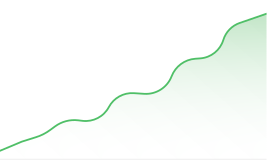
Cumulative profit
Any timeframe
Test your strategy at the scale it was designed for: from minute-level moves to long-term market cycles.
1m 1w
RSI + CCI + Filter
Entry 3
Exit 2
Flexible trading logic
Combine indicators to test complex trade entry and exit scenarios.
Fast calculation
Get results in seconds, compare variants, and move on to the next trading hypothesis faster.
Calculation 4.8 sec
#2
#3
Backtest archive
Access a database of billions of calculations
Get access to the database of saved Veles backtests, explore already tested strategies, compare results, and find starting points for new trading hypotheses.
Find a ready backtest
PairStrategyReturnDrawdown
BTC/USDT Grid · trend +312.7% −18.6%
ETH/USDT RSI · volume +184.2% −11.4%
SOL/USDT Level breakout +96.5% −22.1%
TON/USDT Averaging +41.8% −9.7%
XRP/USDT DCA · filter +28.4% −7.2%
Billions of calculations
From hypothesis to live trading: in one service
Create a strategy, test it on historical data, adjust the parameters, and launch the bot without leaving your Veles account.
01
Create
Set up the strategy and the entry/exit conditions.
02
Test
Run a calculation on historical minute or tick data.
03
Analyze
Compare versions and adjust the parameters.
04
Launch
Turn the strategy into a live bot.
Scale your calculations
as you grow
All plans include Veles backtests. They differ in volume and the number of parallel calculations.
Starter
Targeted strategy work
$15 / month
- Test volume 15,000 years
- Concurrent 1 test
Pro Popular
Systematic strategy optimization
$29 / month
- Test volume 150,000 years
- Concurrent 5 tests
Quant
Large-scale optimization
$99 $69 / month
- Test volume 1,500,000 years
- Concurrent 50 tests

The test-years limit means the total duration of the processed historical periods.
Veles ecosystem
One platform: the whole trading cycle

Still have questions?
Answers to questions before your first backtest.
01
What is backtesting in trading?
A backtest checks a trading strategy on historical data. It shows which trades a bot would have made and with what result. In Veles you can evaluate an idea before launching it: see profit, losses, and drawdowns over the chosen period.
How backtests work 02
Can I run a backtest for free in Veles?
Yes, the Free plan is available for your first checks. 5 years of analysis are credited every day, and you can accumulate up to 15 years. Paid plans are available for larger test volumes; current limits are shown in your account.
Free plan terms 03
How do I run a trading bot backtest?
Set up a bot in Veles and click "Test" in the editor, or start a test from the backtest showcase. Choose a history period, enter your exchange fees, and confirm the calculation.
Launch guide 04
Do I need an exchange deposit for a backtest?
No real deposit is needed: the simulation uses the amount you set. However, an active exchange API connection in your Veles account is required to start. The backtest itself does not open real trades.
What you need for testing 01
What do "years of analysis" mean in the plans?
It is the volume of history being tested, not the subscription term or the age of the data. Usage equals the period length multiplied by the number of trading pairs: one year on three pairs uses three years of analysis. Running the test again uses the limit again.
How the limit is calculated 02
How is a tick backtest different from a candle backtest?
A tick calculation reproduces price movement inside a candle in more detail and helps check order execution more accurately. In Veles it is available for Bybit Futures on the Pro and Quant plans. The current calendar day is not available for this calculation.
Tick calculation features 03
Which period is best for testing a strategy?
Choose a long period that includes rising, falling, and sideways price movement. This lets you see how the strategy behaves in different market conditions, which drawdowns it survives, and how stable its result is. For most exchanges, Veles provides the full history since the asset was listed.
01
How do I know a backtest shows a good result?
Start with the tags and key metrics in the backtest header: they help you quickly evaluate the strategy and see what to pay attention to. Tags may tell you, for example, that the result is good, the deposit load is elevated, or there is not enough data for evaluation. To dig deeper, study the detailed metrics, the chart, and the list of trades to see what the result is made of.
How to read backtest results 02
Are fees included in backtest results?
When starting, enter the actual trading fees of your exchange. In the report, Gross shows the result before fees and Net after them. To compare strategy variants, use the same mode and the same rates: fees can turn a seemingly profitable trade into a loss.
How to read Net and Gross 03
Does a profitable backtest guarantee income in real trading?
No. A backtest describes the past under the given calculation conditions. In the future, the market, liquidity, and order execution prices will change. Use the result to filter out weak ideas and assess risks; even a successful test does not rule out losses when the bot is launched.
04
Can I return to the results and share a backtest?
Yes, a completed calculation can be opened again. The Share button creates a link to the test, which is handy to send to a colleague or attach to a support request.
Working with results