


Grid Bots Are Now Available on Veles. How to Make the Most of a Sideways Market
Sometimes a coin stays in the same range for weeks: it rises a couple of percent, drops by the same amount, and never picks a clear direction. Which bot can profit from such a market?
The answer is a grid bot. It places a grid of orders within a price range and earns from price fluctuations, so it does not need a trend. You can now launch a grid bot on Veles — not only in Long or Short mode, but also in Neutral mode. In Neutral mode the bot opens long or short positions depending on where the price moves, so you do not have to choose a direction in advance.
In this article you will learn how a grid bot is structured, how it differs from a DCA bot, and how to launch it step by step on Bybit via Veles Broker. Towards the end you will find Veles’s rule on how much to keep on the exchange balance to reduce the risk of liquidation if the price leaves the range.
What Is a Grid Bot and How It Works
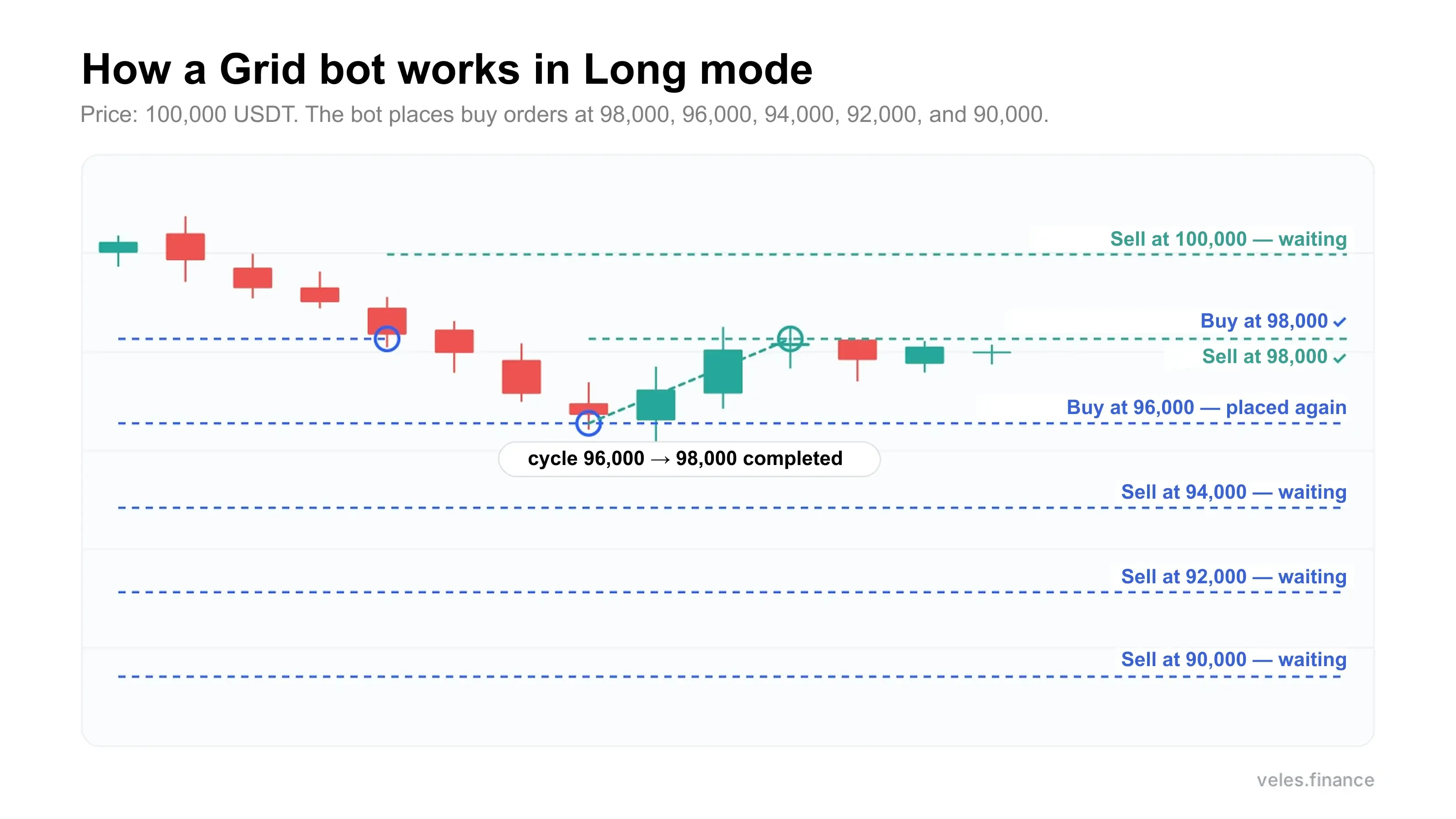
A grid bot (grid bot) divides a price range into levels and places limit orders on them. The idea of grid trading is to close every filled order with a counter-order on the neighbouring level: in long mode you buy lower and sell higher, in short mode you do the opposite. The bot repeats this many times as long as the price stays inside the range.
How a grid bot works on Veles:
- You set the lower and upper price of the range and either the number of orders or the spacing between them. The bot places orders at the levels inside the range.
- When a grid order is filled, the bot immediately places a counter-order on the neighbouring level. The pair of the original order and the counter-order is called a cycle.
- When the counter-order is filled, the cycle closes, the profit is locked, and the bot places a new order on the original level again.
- Cycles repeat as long as the price remains inside the range.
Futures Grid Bot in Long, Short and Neutral Modes
Grid bots on Veles work in three modes.
| Mode | Where the grid is placed | How a cycle works | When to choose it |
|---|---|---|---|
| Long | below the current price, buy orders | buy → sell one level higher | you expect the price to fluctuate and not fall below the lower boundary |
| Short | above the current price, sell orders | sell → buy one level lower | you expect the price to fluctuate and not rise above the upper boundary |
| Neutral | on both sides of the current price | below the price — Long cycles, above — Short cycles | you expect fluctuations in both directions and do not know which way the price will go |
Veles DCA bots do not have a Neutral mode: a DCA bot trades only in one direction. To trade the same coin both long and short you need to run two DCA bots and enable hedge mode on the account. A grid bot in Neutral mode does not need a second bot.
How a Grid Bot Differs from a DCA Bot and When to Choose Which
A grid bot is suitable for a sideways market when the price moves in a range without a clear trend. A DCA bot is suitable when the price pulls back against the position and then reverses: on the pullback it adds to the position, and on the reversal it exits.
| DCA bot | Grid bot | |
|---|---|---|
| When it enters a trade | on an indicator signal, by a price filter, or immediately | immediately after launch |
| Which orders it places | averaging orders, in one direction from the entry | in Long — buys below the price, in Short — sells above, in Neutral — on both sides; the bot places a counter-order when a grid order is filled |
| How it locks profit | take-profit on the entire position, with one or several orders, or on an indicator signal | each cycle closes separately on the neighbouring level |
| Direction | long or short | Long, Short or Neutral |
| Backtest on Veles | available | available |
A grid bot goes into loss if the price leaves the range and continues to move. For Long this is a move down, for Short — up, for Neutral — in either direction. How to limit this loss is covered in the risks section.
How to Set Up a Grid Bot on Bybit via Veles Broker
Veles Broker is a Veles brokerage account on the Bybit exchange. Veles creates a sub-account for you on Bybit, and the bot’s orders are executed in the exchange order book. At launch, grid bots will be available only to Veles Broker users.
Step 1. Open a brokerage account
If you do not yet have a Veles account, sign up. Then open the “Broker” section in your profile. Confirm your email, top up the Veles balance with a single transfer of at least 2 USDT and complete identity verification in Sumsub. You will need an identity document and a camera for a selfie. After verification Veles will create a sub-account on Bybit, an API key and a binding to it — it will appear in the “API Keys” section. Step-by-step instructions are in the Veles help center.
Step 2. Fund the account
In the “Broker” section click “Deposit” and transfer USDT from a wallet or buy them with a card via a partner exchanger. The minimum amount is 10 USDT. Funds arrive in the “Funding Account”; transfer them to the “Trading Account” for trading. How to top up the sub-account with a card is described in the Veles help center.
Step 3. Select GRID in the configurator
Click “Create bot” and switch the DCA | GRID toggle at the top of the screen to GRID. If you have already started configuring a DCA bot, Veles will ask whether to switch in the same window or open GRID in a new one. When switching in the same window, DCA settings are not transferred; only the API key, pair and deposit are kept. If you open GRID in a new window, the DCA draft remains.
Step 4. Enter the name, API key and trading type
Enter the bot name. In the “API key” field select the brokerage account binding. In the “Trading type” field choose Neutral, Long or Short.
Step 5. Choose the trading pair
Take a pair from the “Recommended pairs for 24 hours” block or enter it manually. In this block Veles shows pairs that had the most profitable trades in the last day. The selected pair will appear on the chart on the left.
Step 6. Set the deposit, leverage and margin type
The deposit must be less than the balance on the exchange, otherwise Veles will show a warning. Choose leverage from 1 to 100 and margin type — cross or isolated. Start with low leverage: the higher the leverage, the smaller the adverse price move that leads to liquidation.
Step 7. Set the range and order grid
Specify the lower and upper price between which the bot will place orders. The “Order grid” field has two modes; the toggle is on the right above the field:
- “Number of orders” — you specify how many orders to place, and Veles shows the spacing between them in percent on the right in the field;
- “Spacing” — you specify the spacing in percent, and Veles shows how many orders will fit in the range.
Step 8. Check the grid and create the bot
When you set the range and grid, orders will appear on the chart — green “Buy” marks and red “Sell” marks with price and volume. Under the chart click “Open table” and Veles will show all orders as a list. To test the grid on historical data, click “Test”. If the grid suits you, click “Create bot” and the bot will appear on the GRID tab on the main cabinet page. Start it with the “Start” button in the bot card.
After launch, monitor the bot in the “Active trades” section on the GRID tab, and view results in “Statistics”, also on the GRID tab. The “Close position” button closes the position at market while the bot continues working. The “Cancel trade” button cancels all orders and stops the bot; the position can be closed or left on the exchange and managed manually.
How Much to Keep on the Trading Balance and How to Limit Losses
Here is what you need to consider when trading with grid bots.
The price left the range and continued to move. The grid is not recalculated. If the price falls below the lower boundary, all buy orders of a Long bot are filled: the position equals the sum of all grid orders, and the loss grows with every step the price moves down. You can calculate this amount in the order table by summing the “Notional” column. The same happens with a Short bot when the price rises above the upper boundary. With a Neutral bot, when the price exits downward all buys of the lower half of the grid are filled; when it exits upward all sells of the upper half are filled. If the price exits upward for a Long bot or downward for a Short bot, cycles close, there is no position, and the bot waits for the price to return to the range.
Spacing smaller than fees. Each cycle consists of two orders, and the exchange charges a fee on both. A test Veles bot on XRP with spacing less than one-tenth of a percent closed 13 cycles. They brought 2 cents before fees, while the exchange fee was 46 cents. The spacing must be greater than two exchange trading fees, otherwise the cycle will not cover the fees.
No stop-loss. Grid bots currently do not have a general stop-loss or take-profit, so limit the loss manually with the “Close position” and “Cancel trade” buttons.
If the bot trades on cross margin without a stop-loss, keep an amount on the exchange balance according to the Veles rule:
- Maximum Adverse Excursion (MAE) is less than the deposit — keep deposit × 2 on the balance;
- MAE is greater than the deposit — keep MAE × 2;
- if there are several bots, the sum of their MAE must not exceed half of the balance.
On isolated margin the loss upon liquidation must not exceed 1% of the trading account balance.
Be sure to estimate the MAE yourself: look at the chart to see how deeply the coin fell over the last year and calculate the position loss at such a drop. For example, a Long bot has a deposit of 100 USDT and leverage x5, all grid buys from 98,000 to 90,000 are filled, and the position is 500 USDT at an average price of 94,000. Suppose over the last year the coin fell 10% below the 94,000 level — to 84,600. At such a drop the floating loss would be 50 USDT. This is less than the deposit, so keep 200 USDT on the balance.
If you are just starting out, open the beginner bot in Telegram — the button is below.
Frequently Asked Questions
This material is for informational purposes only and is not an investment recommendation. Leveraged trading involves the risk of losing funds.